



If you’ve used Gemini, you might have noticed the model selector on the bottom right of the chat. The short explanations don’t do much to answer the question, which should you use, and when?
Other AI tools like ChatGPT also have various models, but I found fewer resources discussing the Gemini models, so let’s take a look.
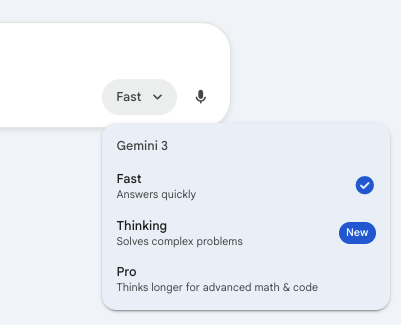
Here’s my take:
Fast: if you need it RIGHT NOW*
Thinking: if you need it RIGHT
Pro: if you need it DEEP
*speed aside, sometimes Fast is actually the best choice - read more to find out why

Let’s talk about each more depth.
About the Models
Fast
I always start with the fast model. It’s good at an astounding amount of tasks, even things we might think are “complex”, like pulling themes out of a hundred survey responses.
The persona: That friend who always is quick to reply
Good for: quick single tasks, remembering the details of your chat as you go
Downside: bad at complex logic, can’t handle huge amounts of data
Life Admin examples: What can I cook with these three ingredients?, Find themes in these responses to our PTA survey.
Thinking
The thinking model is totally focused on the task right in front of it - sometimes at the expense of context. It uses “chain of thought” type reasoning, going through intermediate reasoning steps before producing a final answer.
The persona: A grandmaster chess player - brilliant, but hyper focused on the current move
Good for: tasks that have multiple steps or components
Downside: usage limits, might overthink simple questions, less conversational, and can lose context from earlier in the conversation because it’s so focused on the current problem
Life Admin example: How do I build a summer camp schedule around all of our preferences and commitments?
Pro
The strength of Pro is that it can look at LOTS of data.
The persona: A brilliant PhD student who has thousands of pages of reading in the back of her mind - just don’t expect her to remember to take out the trash
Good for: analyzing long documents, comparing lots of data
Downside: usage limits, sometimes too verbose, sometimes has trouble following simple instructions in the prompt (like formatting requests) because it has so much data to juggle and it gets distracted - you can always remind it in the chat
Life Admin example: Help me understand this 100-page HOA PDF and how it compares to this standard HOA template.
Takeaway
No matter what I’m doing, I almost always use Fast first - it’s free, and has the smallest environmental impact. If it’s struggling with my ask, I move on to another model.
Even though Thinking and Pro are the “premium” models, sometimes they just aren’t the best choice! Like with any tool, to be successful, you have to match the tool to the task.


