



I don’t use AI to write my posts. Not that there’s anything wrong with it, but I write because I like writing.
But lately I’ve been curious: how easily could I train AI to write like my Substack? Not just mimic me in a vague, “here are some sentences in a similar style” way, but actually pick up on the way I structure things, the rhythm of my paragraphs?
So I tried it.
Here’s how to do it
Substack lets you export all your posts. Here’s how:
Go to your publication’s Settings > Import/Export > Export Your Data. You’ll get a zipped folder. Double-click to unzip it, then delete anything that’s a draft or not an HTML file. (Mine had a couple of CSVs in there. Those can go.)
What you’re left with is your full publishing history as a set of HTML files. Your voice, your structure, your patterns, all laid out in a way an AI can actually read and learn from.
I handed those files to both Gemini and Claude and asked them each the same thing: analyze these posts and build a guide to how I write.
What happened
Both of them gave me something usable, but Claude’s result was different in a way that was hard to ignore.
Claude didn’t just list surface-level style observations. It picked up on structure. How I open posts (personal anecdote, surprising statement, or direct question, never “In today’s post I’ll cover...”). How I use parentheses for asides instead of em dashes. That I write short paragraphs and let white space do some of the work. That I include real, copy-paste prompts in code blocks. That I often end on a question, not a summary.
It also captured the things I do instinctively, the stuff I’d never thought to articulate: that I’m warm but not gushing, that I trust my readers to be smart, that I’d rather show something specific than tell you it’s something jargony like a “game-changer.”
Reading it felt a little creepy, to be honest, like it was looking over my shoulder.
Gemini’s version was fine, but it was more of a template, where Claude gave me more of a detailed style guide with more about my audience and the why behind certain choices. It also included examples. I especially liked its list of things to avoid and what to do instead. Gemini also capped me at 10 files, so I couldn’t attach all my posts.
Why I loved this - even if I probably won’t use it
If you do write, whether it’s for a newsletter, a blog, social posts, or even long emails, this is worth doing. Even if you don’t want AI to write for you, it’s useful to have a document that articulates your own voice back to you. You might even uncover patterns that you want to avoid.
The prompt
Try this prompt, along with your attached Substack posts:
I'm going to share a collection of my Substack posts. I'd like you to analyze them carefully and create a detailed style guide that captures how I write — my voice, my sentence structure, how I open and close posts, how I use formatting, what I avoid, and any patterns you notice. Be specific. Include examples from my actual writing.Depending how you’re going to use the style guide, you can add “I plan to use this as a Claude Skill” or “I want to use this as the instructions for a Gemini Gem” (or custom GPT).
Your result might look different depending on how many posts you have and how consistent your style already is.
How to use a Skill in Claude
If you’re doing this in Claude, tell it that you want to install the style guide as a Skill. When I did this, I got a Save skill button that let me click to install.

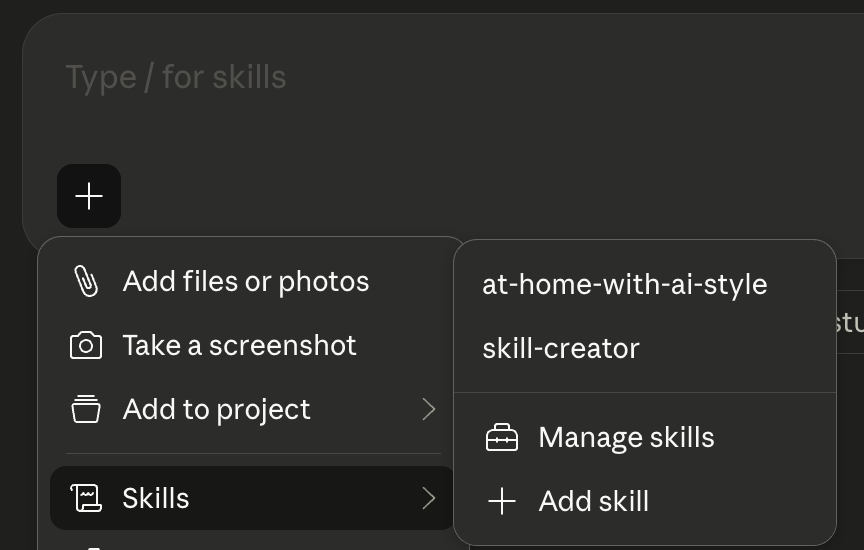
After installing a Skill, you can use it by clicking the plus sign (+) at the bottom of the chat window. Select Skills, then the name of your skill.
What do you think?
I mentioned I don’t want AI to do my writing, and I think I’ll stick with that. But this post might be different (or it might not…)
Poll: Do you think I used the skill to write this post? If so, what percentage of this post was written by Claude?


